Help — How to Use the BPM Dictionary
Last updated: February 18, 2026
1) Search tutorial (step-by-step)
The search box can find results using any of these: BPM (Eastern Nagri) Romanized English meaning IPA (if available)
Enter a query in the search box. You may type BPM script (Eastern Nagri), Romanized, or English.
বিষ্ণুপ্রিয়া, bishnupriya, flowerClick the search button (or press Enter).
Up to 10 results are shown per page. If there are more, use pagination (Next/Previous).
Click any result to view full entry details (BPM spelling, Romanized, IPA, POS, meaning, and more if available).
Try a shorter query, check spelling, or search using Romanized/English. The site may also show fuzzy/similar matches.
2) If you do NOT have BPM script input software
Many users cannot type BPM (Eastern Nagri) because they do not have a Bangla/Bengali keyboard installed. This site provides a built-in solution called the BPM Keyboard.
How to use the built-in BPM Keyboard
- Go to the homepage search box.
- Click the Bangla Keyboard button (this opens the BPM Keyboard).
- Choose a layout:
- Mobile — tap letters and signs (phone-friendly)
- Classic — full letter layout
- Type your word and search normally.
1) Open keyboard → choose Classic
2) Type:
ইমা(no space)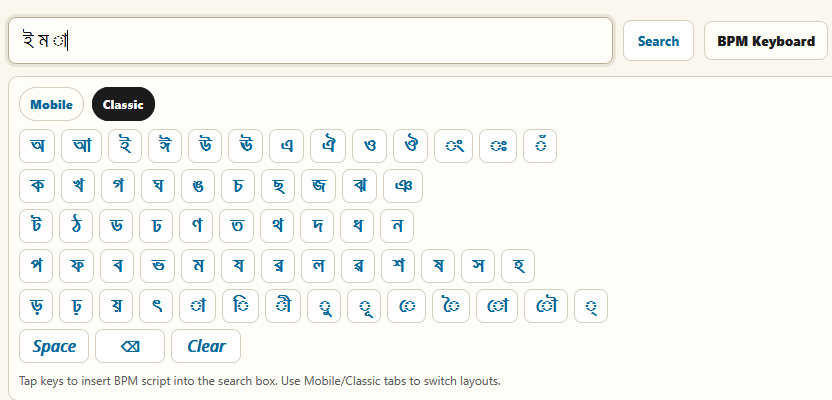 3) Preview shows Eastern Nagri output
4) Click Use in search → then Search
If you already use a mobile Bangla/Assamse keyboard (Gboard / Ridmik / etc.), you can type directly. The built-in BPM Keyboard is mainly for users who do not have any script input method installed.
3) Pronunciation & Audio
Pronunciation support is one of the main features of this project:
- Many entries include IPA and/or Romanized forms (still being refined).
- 16,000+ words include audio pronunciation.
 next to the main word display. Click it to play pronunciation.
Audio coverage is expanding. If you notice missing or incorrect audio, please email us.
4) Using the conversion tools
Tools under the Tools menu help compare spelling and pronunciation forms.
- BPM to IPA (
bpm_ipa.php) — rules in progress - IPA to BPM (
ipa_bpm.php) — rules in progress - BPM to Romanized (
bpm_roman.php) - Romanized to BPM (
roman_bpm.php) - IPA Rules (
bpmtoiparules.php) - Romanization Rules (
Romanization.php)
5) How researchers can benefit (learning & research)
This BPM Dictionary is designed to support research on Bishnupriya Manipuri language and vocabulary. Depending on the entry, researchers may benefit from:
- Etymological information/বাক্যত ব্যবহার (when available)
- Pronunciation (IPA, Romanized, and audio)
- Origin of the word (when available)
- Dialect notes (when available)
- Part of Speech (POS) and usage notes (when available)
fish / flower) → open several entries →
compare spelling, IPA, Romanization, origin, and dialect notes to study lexical patterns.
Synonyms, antonyms, and pictures
- Some entries already include synonyms and antonyms, but most entries still need to be completed.
- Some entries include pictures, but this section is still a work in progress for most words.
The project is still in progress. Coverage and quality will improve through ongoing proofreading and contributor feedback.
6) Feedback and suggestions
Proofreading is still needed in BPM words, IPA, and Romanization. If you have corrections or improvement suggestions, please contact:
usangraha@gmail.com
Thank you for supporting the BPM Dictionary Project.